AWS Public IPv4 Charge
AWS has recently announced a new charge for public IPv4 addresses (effective February 1, 2024). There will be a charge of $0.005 per IP per hour for all public IPv4 addresses, whether attached to a service or not (there is already a charge for public IPv4 addresses you allocate in your account but don’t attach to an EC2 instance).
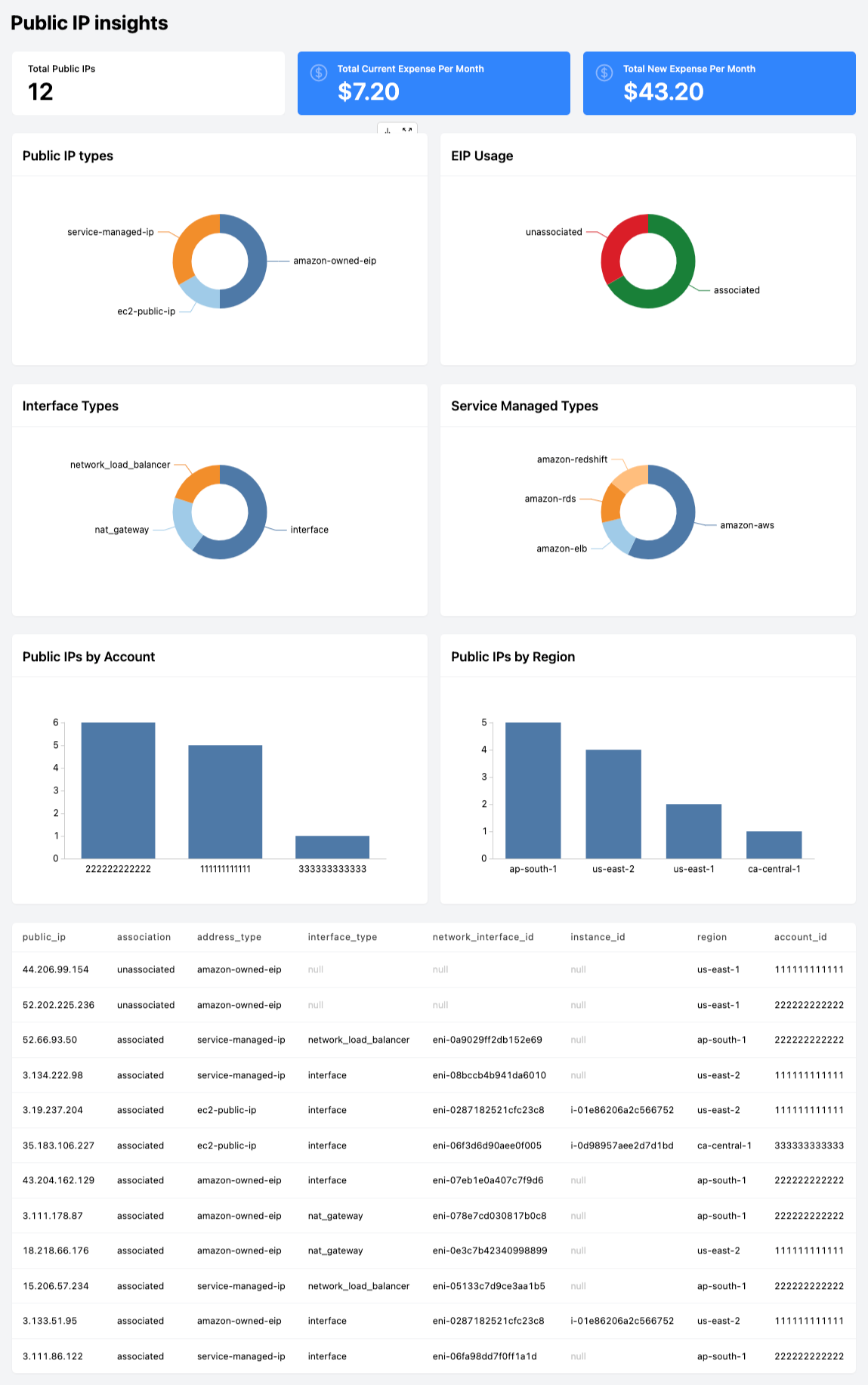
Steampipe is an open source CLI to instantly query cloud APIs using SQL. We will track the usage of public IPv4 addresses using Steampipe and answer questions like:
- How many Public IPv4 addresses do I have?
- How many Public IPv4 addresses are unassociated?
- How much does it cost for my Public IPs today?
- How much will it cost with the new charge?
- How many Public IPs do I have by Account/Region?
There is good documentation available on Steampipe installation and initial setup process, so we will skip these topics here. Use the AWS plugin to query the tables aws_ec2_network_interface and aws_vpc_eip to get the list of Public IPs. With the magic of Steampipe aggregators we can run this query across multiple AWS Accounts.
+----------------+--------------+--------------------+-----------------------+-----------------------+---------------------+--------------+--------------+
| public_ip      | association  | address_type       | interface_type        | network_interface_id  | instance_id         | region       | account_id   |
+----------------+--------------+--------------------+-----------------------+-----------------------+---------------------+--------------+--------------+
| 44.206.99.154  | unassociated | amazon-owned-eip   | <null>                | <null>                | <null>              | us-east-1    | 111111111111 |
| 52.202.225.236 | unassociated | amazon-owned-eip   | <null>                | <null>                | <null>              | us-east-1    | 222222222222 |
| 3.111.86.122   | associated   | service-managed-ip | interface             | eni-06fa98dd7f0ff1a1d | <null>              | ap-south-1   | 222222222222 |
| 35.183.106.227 | associated   | ec2-public-ip      | interface             | eni-06f3d6d90aee0f005 | i-0d98957aee2d7d1bd | ca-central-1 | 333333333333 |
| 3.134.222.98   | associated   | service-managed-ip | interface             | eni-08bccb4b941da6010 | <null>              | us-east-2    | 111111111111 |
| 3.19.237.204   | associated   | ec2-public-ip      | interface             | eni-0287182521cfc23c8 | i-01e86206a2c566752 | us-east-2    | 111111111111 |
| 52.66.93.50    | associated   | service-managed-ip | network_load_balancer | eni-0a9029ff2db152e69 | <null>              | ap-south-1   | 222222222222 |
| 43.204.162.129 | associated   | amazon-owned-eip   | interface             | eni-07eb1e0a407c7f9d6 | <null>              | ap-south-1   | 222222222222 |
| 3.133.51.95    | associated   | amazon-owned-eip   | interface             | eni-0287182521cfc23c8 | i-01e86206a2c566752 | us-east-2    | 111111111111 |
| 18.218.66.176  | associated   | amazon-owned-eip   | nat_gateway           | eni-0e3c7b42340998899 | <null>              | us-east-2    | 111111111111 |
| 3.111.178.87   | associated   | amazon-owned-eip   | nat_gateway           | eni-078e7cd030817b0c8 | <null>              | ap-south-1   | 222222222222 |
| 15.206.57.234  | associated   | service-managed-ip | network_load_balancer | eni-05133c7d9ce3aa1b5 | <null>              | ap-south-1   | 222222222222 |
+----------------+--------------+--------------------+-----------------------+-----------------------+---------------------+--------------+--------------+
Here's the query to capture the list of Public IPs.
select
  association_public_ip as public_ip,
  case
    when attachment_status in ('detaching', 'detached') then 'unassociated'
    when attachment_status in ('attaching', 'attached') then 'associated'
  end as association,
  case
    when attached_instance_id is not null then 'ec2-public-ip'
    when attached_instance_id is null then 'service-managed-ip'
  end as address_type,
  interface_type,
  network_interface_id,
  attached_instance_id as instance_id,
  region,
  account_id
from
  aws_ec2_network_interface
where
  association_public_ip is not null
  and association_allocation_id is null
UNION ALL
select
  public_ip,
  case
    when association_id is null then 'unassociated'
    when association_id is not null then 'associated'
  end as association,
  case
    when public_ipv4_pool = 'amazon' then 'amazon-owned-eip'
    else 'byoip'
  end as address_type,
  case
    when network_interface_id is not null then (select interface_type
    from aws_ec2_network_interface
      where network_interface_id = aws_vpc_eip.network_interface_id)
    when network_interface_id is null then network_interface_id
  end as interface_type,
  network_interface_id,
  instance_id,
  region,
  account_id
from
  aws_vpc_eip
order by
  association desc
Use Steampipe Dashboard for fancy visualization like AWS Public IP insights. Here is the sample mod used to generate the following.
Dive into meaningful and data-driven insights by leveraging SQL with Steampipe. Happy Querying!